Next-Gen Scientific Peer Review Powered by Agentic AI: Google Deep Review
Stephen Cheng
Intro
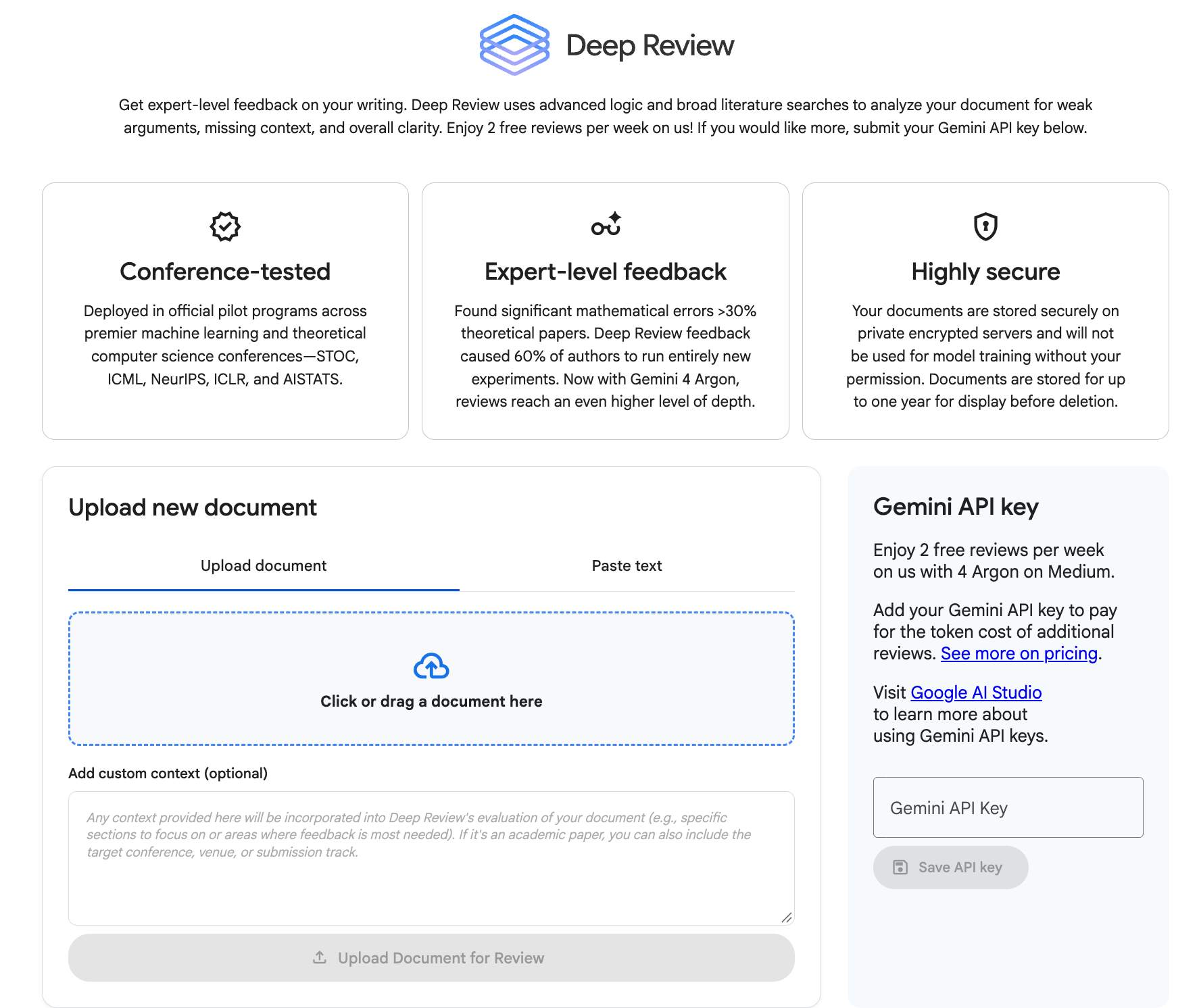
Imagine handing a friend a 50-page report and giving them 10 minutes to find mistakes. They’ll catch a few typos, sure, but they’ll likely miss that a number on page 5 contradicts page 35.
Now imagine giving that report to a team of specialists. Everyone gets the full context, one person checks the math, another reviews the experiments, and an editor compiles and verifies their notes. That team catches the mistakes that actually matter.
Google Deep Review turns that team approach into software. Built by Google Research, this agentic AI system checks long, complex documents by splitting them into sections, reviewing them in parallel, and combining the findings into one final report.
This article explores what Deep Review is, how its 4-stage pipeline works, what Google’s published results show, and how we can build this pattern by ourselves.
What Is Google Deep Review?
Google Deep Review is an agentic AI system that gives feedback and technical verification on long, complex documents. It splits a document into sections, checks each section in parallel, and combines the results into one report.
Deep Review was first built for research papers. According to Google, it also works for design documents, presentations, and legal and financial documents now. It is like the team plus the editor. It splits the work up so that each part gets a careful look, instead of reading the document once and giving a first impression.
In a Nutshell
- Deep Review splits a document into sections, gives harder sections more compute, reviews every section in parallel with the full document in view, then merges and fact-checks the findings.
- On a math and computer science subset of the SPOT benchmark (26 papers, 29 errors), Google’s Paper Assistant Tool (PAT) caught 89.7% of errors, against 55.2% for Gemini 3.1 Pro used on its own.
- Every user gets 2 free reviews per week. It accepts PDFs and plain text only.
- All accuracy numbers come from Google and from authors who opted in. Nobody has independently tested the public version yet.
- It checks the reasoning in our document, not our code, so a pipeline bug can still produce wrong numbers that look consistent.
Why did Google build Deep Review?
AI has made writing documents cheap, but checking them is still slow and expensive. Google calls this the validation bottleneck: information is generated faster than it can be rigorously reviewed.
According to Google, combined submissions to 3 major AI conferences (ICLR, NeurIPS, and ICML) grew from about 23,000 in 2023 to roughly 74,000 in 2026. However, the number of qualified reviewers did not triple over the same period.
From PAT to Deep Review
Deep Review started out as the PAT. Google piloted it with 4 computer science conferences: STOC 2026, ICML 2026, NeurIPS 2026, and ICLR 2027.
Authors could opt in and get private feedback on their paper before the deadline. More than 16,000 papers went through the pilots. The feedback was kept separate from the official peer review, so it had no effect on whether a paper was accepted.
The public version adds support for Gemini 4 Argon, which Google says makes it stronger than the older PAT. Google has also built a related pattern into Antigravity, its agent-based coding environment.
How Does Deep Review Work?
Deep Review works as a 4-stage pipeline: it splits the document, budgets effort per section, reviews the sections in parallel, and merges the findings.
The obvious way to review a paper with a large language model (LLM) is to paste the whole thing in and ask for feedback. Google gives 3 reasons it falls short:
- The model runs out of thinking budget before it reaches the hard parts.
- It misses dependencies between distant sections.
- It accepts nuanced claims without scrutinizing them.
Let’s go through each stage.
Stage 1: Document segmentation
A segmenter agent breaks the document into logical pieces such as the introduction, methods, experiments, and proofs. The pieces can overlap, but together they must cover the whole document. This is like the team deciding who checks which chapter before anybody starts reading. No part of the document gets skipped.
Stage 2: Adaptive compute budgeting
Some sections are much harder to check than others. A long mathematical proof needs far more careful thought than a related work section, which is mostly a list of other papers. So, Deep Review inspects how dense each piece is and gives the harder ones more compute.
Google’s paper describes light, medium, and high thinking tracks, with proofs and theory getting the high track. It’s like a model with a “thinking” setting and applied to each section separately.
Stage 3: Deep parallel verification
Next, reviewer agents check all the sections at the same time. Each agent focuses on its own section, but every agent can still see the whole document. Say, in a paper, Section 5 uses a result that was worked out in Section 3. The agent checking Section 5 can go back and see whether the two match. A model that only had Section 5 in front of it would have no chance of catching that.
Stage 4: Global synthesis and grounding
Lastly, a synthesis agent plays the role of our editor. It combines the section reports, removes duplicate comments, looks for contradictions between sections, and reruns any logic checks it isn’t sure about. It also runs grounding checks against outside sources, including Google Search, to catch hallucinations such as papers or theorems that don’t exist. Without this step, the reviewer could confidently flag problems that aren’t real and waste our time.
How to Use Google Deep Review?
Setting up the first review
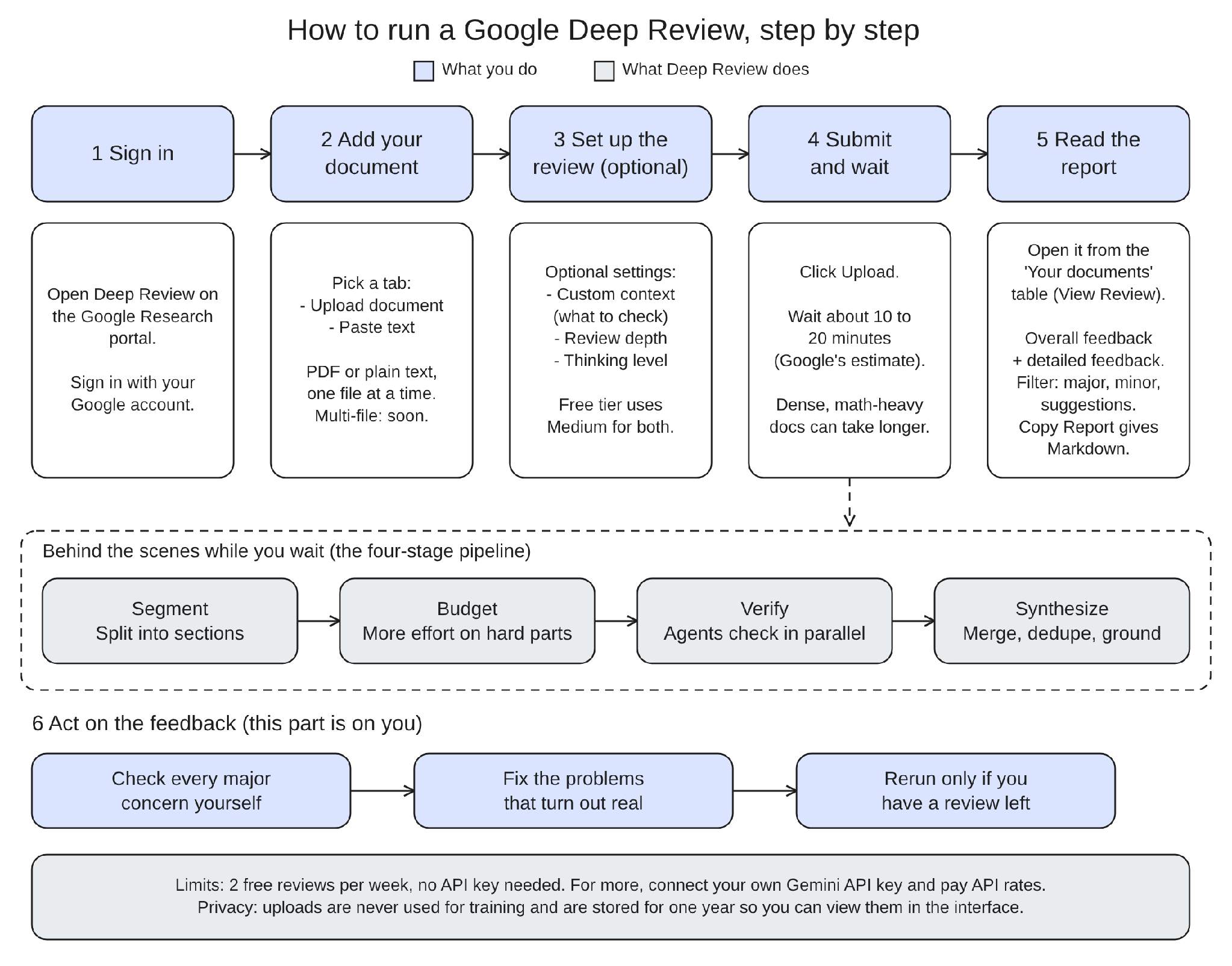
Using Deep Review takes a few minutes of setup, then a wait while the agents work:
- Go to the Deep Review Portal.
- Sign in with a Google account.
- Upload a PDF or paste in plain text.
- Optionally, add custom context to tell it what to check, and set the review depth and thinking level. Free reviews use Medium for both.
- Start the review. It takes about 10 to 30 minutes.
A few limits to know about:
- We get 2 free reviews each week, and we don’t need an API key for them.
- PDFs and plain text are the only accepted formats right now.
- Multi-file support is coming soon, which would suit a paper plus its appendix.
Reading the report
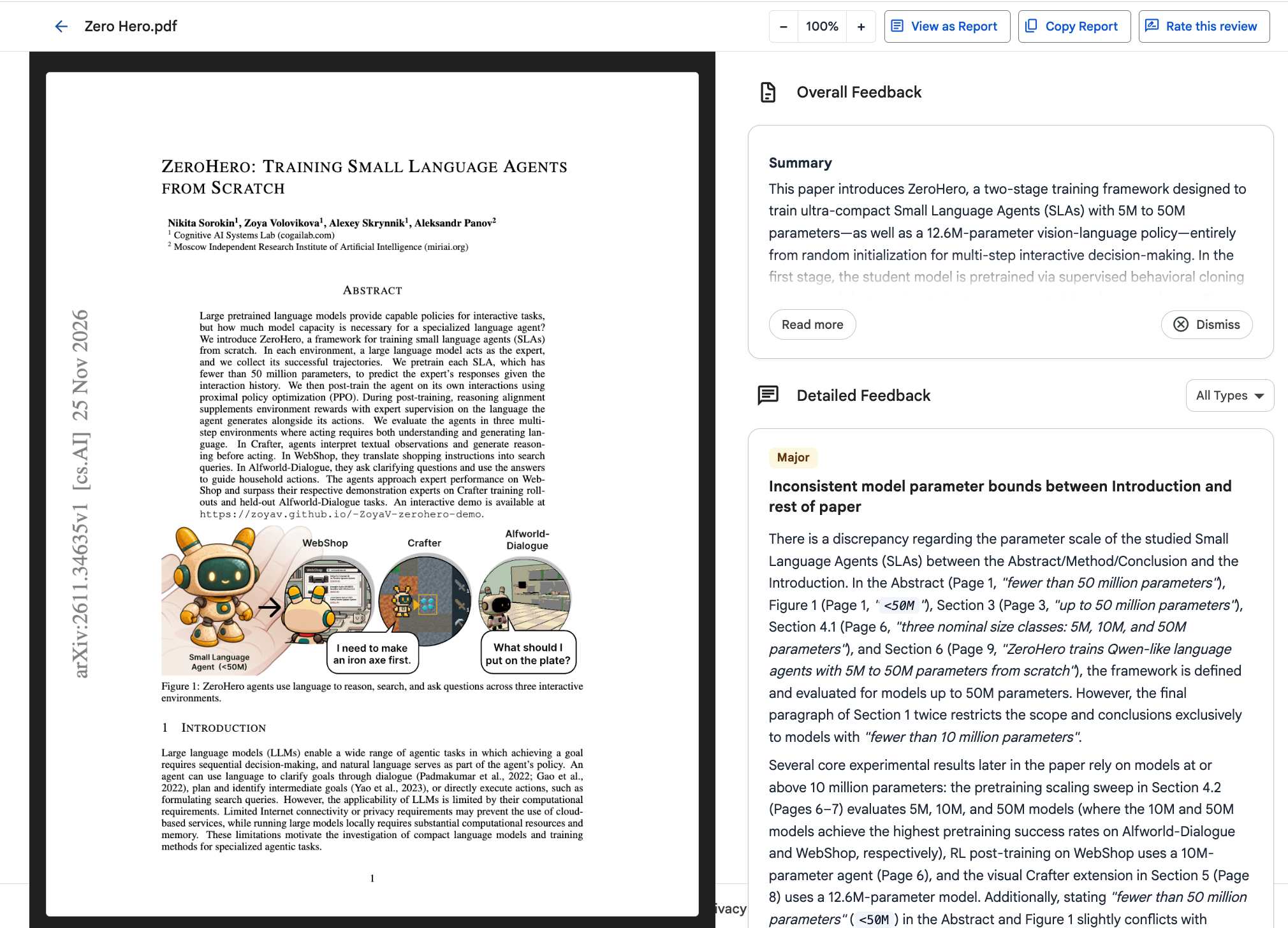
The report starts with an Overall Feedback, a summary, then gives Detailed Feedback underneath. We can filter the detailed comments into major concerns, minor corrections, and suggestions, and each comment names the section or page it refers to.
There is also a Comment view and a Copy Report button that copies the whole review as Markdown. That’s handy for pasting into our notes and working through it point by point.
How to Build a Deep Review-Style Pipeline in Python?
Deep Review is a map-reduce pattern built from LLM agents: split the work up, check the pieces in parallel, then put the results back together. We can build a simple version in less than 100 lines. The example below uses the Google Gen AI SDK with Gemini 4.0 Hydrogen testing on a demo document. Its thinking_level setting gives us a way to build our own version of Stage 2.
1 | from concurrent.futures import ThreadPoolExecutor |
Here is how it lines up with the 4 stages:
- split_into_sections() is our segmenter (Stage 1).
- thinking_level() decides the effort for each section (Stage 2).
- ThreadPoolExecutor runs the reviewers in parallel, and each one gets the full document (Stage 3).
- The merge_prompt at the end is our editor (Stage 4).
It is much simpler than the real thing. There is no segmenter agent, no check against Google Search, and no second look at uncertain findings. It does address 2 of the 3 problems Google lists: running out of thinking budget and missing connections between sections. It also has costs to watch.
Yet, every reviewer call carries the full document, so token usage grows with the number of sections. The splitter also treats any line starting with # as a heading, including comments inside code blocks, so test it on our own files first.
How Can We Use Deep Review?
We don’t need to write math proofs to find Deep Review useful. Here are a few places where we think it makes sense:
| Document | What Deep Review can help check |
|---|---|
| Analysis reports | Whether each conclusion is supported by a number in the report |
| A/B test write-ups | Weak statistical claims, or sample sizes that change between sections |
| ML design docs | Places where the architecture section and the evaluation section don’t agree |
| Notebook write-ups | The explanation around our results (export the notebook as a PDF first) |
When Should We Use Google Deep Review?
Google describes Deep Review as checking the reasoning in our document. It doesn’t say anything about running our code, so a bug in our pipeline can still leave us with wrong numbers that look perfectly consistent.
A good workflow looks like this:
- Finish a full draft first. Reviewing half a document uses up one of our 2 weekly reviews.
- Run Deep Review and check every major concern ourselves before changing anything.
- Fix whatever turns out to be a real problem, and rerun it if we still have a review left.
To use it inside our own tools, the Deep Review API lets us run reviews from code, for example, as part of a continuous integration (CI) pipeline. We connect our own Gemini API key, so usage is billed through our Gemini API account. And the cost depends on document length and reasoning effort, so test it on one document before building anything around it.
How Accurate Is Google Deep Review?
Google’s own results show that Deep Review’s predecessor, PAT, caught 89.7% of math and computer science errors on the SPOT benchmark, against 55.2% for Gemini 3.1 Pro used on its own. SPOT is a benchmark built from real mistakes in papers that were later retracted or corrected. Google tested PAT on the math and computer science subset with equation and proof errors: 26 papers containing 29 errors. PAT’s recall was about 34 percentage points higher than the single-call baseline.
Two caveats apply. First, the authors used their own grader, which accepts logically equivalent descriptions of an error, so we can’t compare these numbers directly with the original SPOT results. Second, the paper isn’t consistent about the model: its text describes PAT as powered by Gemini Deep Think, while the results table labels the 89.7% figure as PAT with Gemini 3.1 Pro. Either way, this isn’t the public Deep Review.
The pilot feedback also looks good. Google surveyed authors from the STOC and ICML pilots, which reviewed more than 4,700 submissions in total. Among the 857 respondents (124 at STOC, 733 at ICML):
- 92.7% of STOC and 90.7% of ICML respondents said the feedback was very or mostly helpful.
- About 1 in 10 STOC authors and more than 1 in 3 ICML authors (35.4%) said it found a significant theory error that took over an hour to fix.
- 31% of ICML respondents ran new experiments because of what PAT told them.
Running extra experiments right before a deadline is a big ask, so the feedback must have been convincing. Still, all of these numbers come from Google and from authors who chose to take part, and nobody has tested the public Deep Review independently yet. Treat them as a promising signal, not proof of how it will do on our own documents.
What Are Google Deep Review’s Limitations?
The biggest limitation is that Deep Review can be wrong in both directions. The PAT paper says the pilots surfaced cases where the tool wrongly called a correct proof incorrect because of a reasoning failure, and the authors say they are still working on it.
Grounding is the other number to watch. Only 55.8% of STOC respondents and 64.8% of ICML respondents said the feedback was mostly or fully grounded, so roughly 35% to 44% of respondents did not find it mostly grounded.
It also doesn’t make judgment calls. It won’t tell you whether your idea is new or interesting, and it doesn’t rank papers. That part is still up to us and our reviewers.
Then there’s privacy. Google says it never uses uploaded documents to train, fine-tune, or improve its models, but it does keep them for 1 year so we can see them in the interface. If we’re working on something under a non-disclosure agreement (NDA), we should think twice before uploading it.
Other limitations:
- It’s a closed system with no open weights and no way to host it ourselves, so we rely fully on Google’s models.
- It only accepts PDFs and plain text for now.
- 2 free reviews a week go quickly if we’re making lots of changes to a draft.
- Every accuracy number so far has come from Google.
Conclusion
Deep Review behaves less like a rushed peer and more like a structured review panel, serving best as a final pass before submission so long as we manually audit its major critiques. Despite current limitations around false positives, novelty assessment, and pending third-party testing, the system’s design provides a strong blueprint for long-document agents: task decomposition, dynamic effort allocation, parallel verification, and result aggregation.
AI, Agentic AI, Google, Peer Review — Dec 15, 2026
Search
Made with ❤️ and ☀️ on Earth.